
Remove and Clean Up Lottery Participants Before You Draw
You're about to run the draw and you notice: someone joined twice. Someone joined by mistake. Someone who already dropped out is still on the list. If you draw from a roster that's not actually correct, the result won't be correct either.
Amida-san's Organizer Plan (Pro) gives the organizer the authority to remove participants individually, so you can clean up the list and draw from an accurate roster. This article shows how to use the participant removal feature.

Why drawing from a "wrong" roster matters
Open participation makes joining frictionless, but it also lets the list drift away from what you actually want.
Common roster problems
- The same person joined twice after a retry or repeat tap
- Someone re-joined under a corrected name, leaving a duplicate
- A planned participant dropped out but is still on the list
- An unrelated person joined the event by mistake
A messy roster skews the draw
In a prize draw, a duplicate participant gets an unfair boost in winning probability. In a duty assignment, someone who already left ends up with a duty no one will actually do. The fairness of every draw starts from a correct roster.
How participant removal works
The Organizer Plan (Pro) lets the organizer remove participants individually straight from the participant list.
Clean up the roster before the draw
Remove duplicates, accidental joins, and people who dropped out, leaving only the people who should actually be in the draw. No need to ask everyone to re-confirm by hand -- the organizer can fix the roster directly.

Only the organizer can remove
Removal is an organizer-only action. Participants can't remove each other, so the feature can't be abused.
How to do it
- Subscribe to the Organizer Plan (Pro), sign in, and create your event
- Open the participant list once people have joined
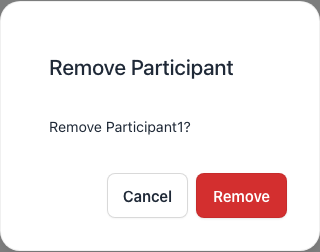
- From the row of the participant you want to remove, choose remove
- Confirm and remove them
- Once the roster looks right, start the draw
Where this helps the most
Workplace prize drawings
For a year-end party prize draw, clearing out duplicate joins before you draw ensures every employee has an equal shot.
Duty and role assignment
For fair role assignment, removing people who've dropped out prevents the draw from assigning duties to people who aren't actually around.
Large online events
For online event lotteries with many participants, accidental joins happen. Being able to remove them on the spot keeps the event moving smoothly.
Frequently asked questions
Try Amida-san Free Now
Q1: Can I remove participants on the free plan?
No. Per-participant removal by the organizer is part of the Organizer Plan (Pro).
Q2: Can I undo a removal?
If the removed person rejoins, they'll be back on the list. So even an accidental removal is recoverable -- just ask them to rejoin.
Q3: Can I remove participants after the draw has started?
Participant removal is designed for cleaning up the roster before the draw. If you've already finalized the result and need to redo it, use re-draw instead.
Q4: Are removed participants notified?
When a removed participant reopens the event, the screen shows that they are no longer a participant.
Q5: How much does it cost?
The Organizer Plan (Pro) is $39 / month or $390 / year (annual saves about 2 months). Participant removal is bundled with re-draws, participation restrictions, and more.
Draw from a correct roster with the Organizer Plan (Pro)
Per-participant removal lives in Amida-san's Organizer Plan (Pro). For $39 / month (or $390 / year -- about 2 months saved), you get participant removal, re-draw, participation restrictions, unlimited result downloads, and the rest of the organizer toolkit. If you want every draw to start from a clean list, give it a try.
Want to see everything the Organizer Plan (Pro) offers in one place? Take a look at every Organizer Plan (Pro) feature, explained.
Other Pro Plan features
The Organizer Plan (Pro) bundles a full set of tools for running lotteries inside an organization. The following articles cover each feature in detail.
- Decorate your event page (event decoration)
- How to redraw a lottery (redraw + history)
- Members-only lottery (participation restriction)
- Save lottery results to CSV / Excel (unlimited downloads)
- Amida3D animation effect (unlimited Amida3D)
- Cancel a mistakenly created event (suspend / restore)
- Prevent accidental edits by participants (account lock)
- Ad-free lottery (no ads for participants)
- 365-day long-term storage (extended availability)
- Issue a receipt (for corporate / expense reports)
All of these are included in the Organizer Plan (Pro) at $39 / month or $390 / year.
Try Amida-san Now!
Experience fair and transparent drawing with our simple and easy-to-use online ladder lottery tool.
Try it Now